


 (C:)
(C:) cs300
cs300
Operating System
A digital computer without an operating system (OS) is just bare metal. The OS is the foundational systems software, a program which provides services to other programs rather than directly to users, managing hardware resources so that application software does not have to. Its kernel manages what runs (processes and threads), where it lives in memory (virtual memory and page tables), and what it reads and writes (files, devices, and the uniform file descriptor interface).
I
1.1. History
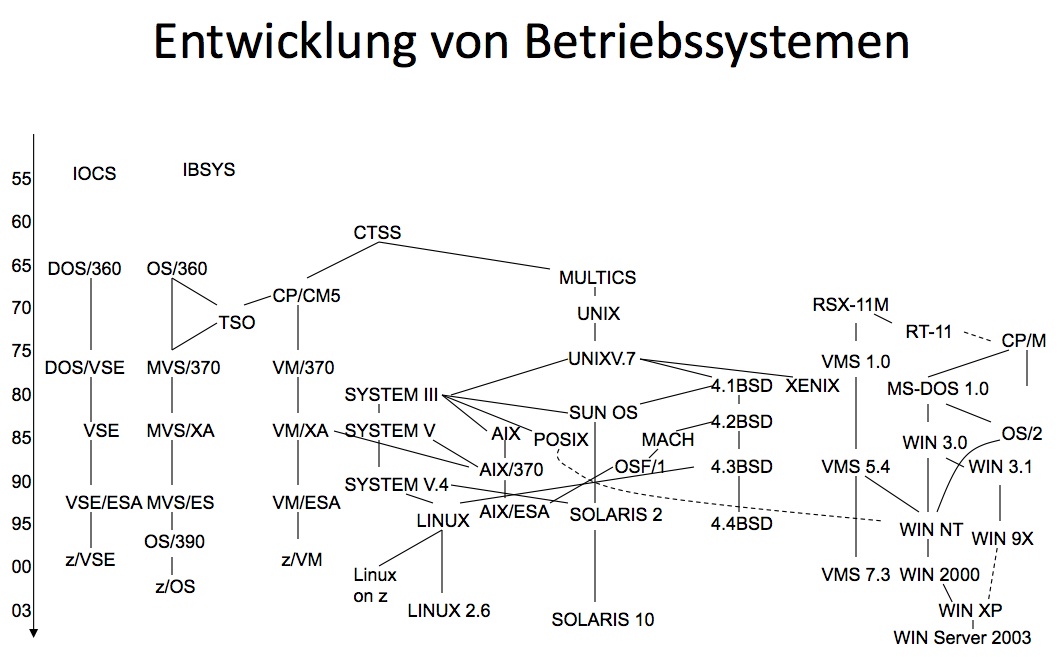
The earliest generation of electronic computers (1940s-50s), such as the ENIAC, were programmed manually in pure machine code by rewiring circuits or feeding in punched cards. Programs ran in isolation, required laborious setup, and left machines idle between jobs. The concept of an OS emerged in the 1950s with batch processing systems, where a human operator stacked homogeneous decks and mounted the tapes and translators only once per batch. In particular, GM-NAA I/O on the IBM 704 carried the software ancestor of the kernel, a resident monitor that took over the sequencing between jobs, reading each deck, running it, and loading the next unattended.
Control cards interleaved in the deck told the monitor which translator to invoke, where the program ended and its data began, what to load next when a run finished or crashed, and so on. Each deck owned the whole machine until completion and nothing yet abstracted the program into a process. The control card grew under successors such as the SHARE Operating System (SOS) and IBSYS into IBM’s Job Control Language (JCL, formalised with OS/360 in 1964) and finally into the Unix shell script. These are the command languages that name which programs run and in what order and become the command line once typed at a terminal.
The process abstraction began in the 1960s with multiprogramming, where several programs resided in memory and turned a program’s I/O wait into another’s CPU time, and the switching obliges the OS to save and restore each program’s execution state. The time-sharing systems (TSS) extended it to interactive users at terminals. For instance, Multics, a joint project of AT&T Bell Labs, GE, and MIT, folded memory and files into one paged virtual address space with its single-level store. That ambition bred complexity, and researchers at Bell Labs distilled the ideas into Unix in 1969, keeping a per-process address space and a single file interface for all I/O.
Personal computing in the 1980s retraced the climb from resident monitor to multiprogramming. MS-DOS (1981) began at the bottom as a single-tasking monitor on the MMU-less Intel 8088. Windows then re-ascended through cooperative (1985) and later preemptive (1993) multitasking once the 386’s protected mode restored memory protection. The control interface took its next step in the same era, from command-line interfaces (CLI) to graphical user interfaces (GUI), and Apple’s System Software (1984, since renamed macOS) on the Macintosh popularised the GUI. A GUI program idles in a message loop until the window system dispatches a keystroke or click.
Linux (1991) later arrived as a free Unix-like alternative and spread across servers, mobiles, and embedded systems. In fact, decades of research settled on the three abstractions shielding programs from hardware, i) process: a running program with an isolated execution environment; ii) virtual memory: an illusion of contiguous address space decoupled from physical memory; and also iii) file descriptor: a uniform read/write interface over every I/O endpoint. Each of the three virtualises one scarce resource, as the process multiplexes CPU time via the timer interrupt, virtual memory multiplexes RAM via the MMU, and the file descriptor multiplexes devices via their drivers.
1.2. Unix
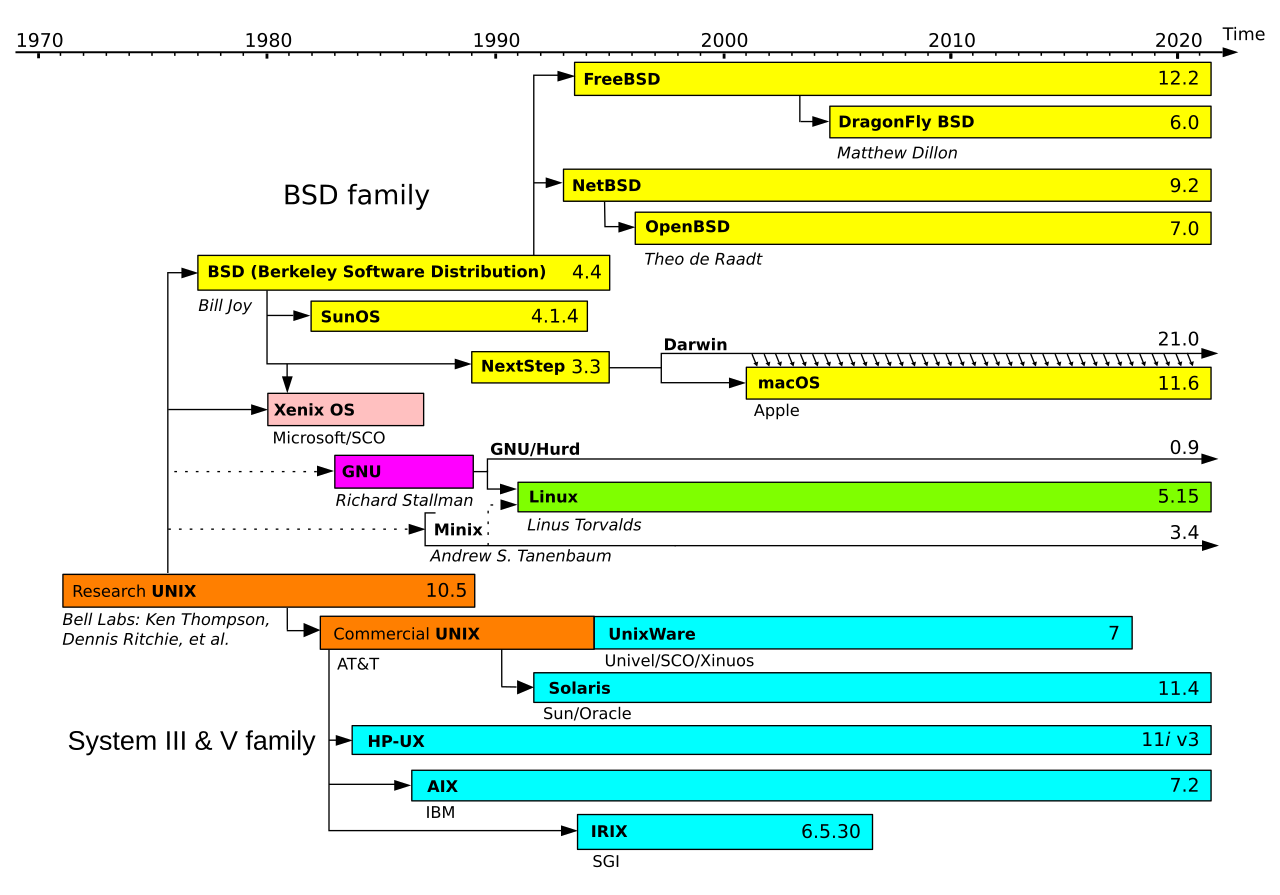
Ken Thompson and Dennis Ritchie (Turing Award, 1983) began Unix on a spare PDP-7 minicomputer. Against Multics’s generality they chose smallness. A compact kernel sat beneath a hierarchical file system (HFS) and a minimal API separated kernel mechanisms from user-space utilities. The decisive move came in 1973, when the kernel was rewritten from assembly into C, a language Ritchie created for the purpose. An OS had always been the property of one machine because it was written in that machine’s assembly, whereas a kernel in a high-level language could be recompiled for any machine with a C compiler (§602#2.1), and Unix thus became the first widely portable OS.
Every program before Unix was coupled to specific hardware since each class of device (e.g. card reader, line printer) demanded its own I/O instructions and access methods. Unix said “everything is a file” after it unified all I/O interface with open()/read()/write()/close() A file is simply a stream of bytes, so a program could now identify it only by a file descriptor and never by its device, and the kernel returns the descriptor as a mere integer on the open() system call that it dispatches each read and write on it to the underlying device’s driver. The shell in turn starts every child process with fd 0, 1, and 2 bound to stdin, stdout, and stderr and rebinds them for redirection.
On top of this uniform interface, Unix added i) the fork-exec-wait process model; ii) pipes (1973, at Doug McIlroy’s insistence) that wire one process’s output into another’s input; and iii) signals that notify processes asynchronously. Combined with plain-text configuration, these primitives made the environment composable and scriptable, as small tools chain into pipelines that solve problems none solves alone. McIlroy distilled the ethos into the Unix philosophy such that a program should do one thing well and work with others. The shell made such composition the daily practice, and a tool written in 1975 still runs in a modern pipeline because the contract never changed.
A 1956 antitrust consent decree had confined AT&T to telephony, so Unix could not be sold and was instead licensed to universities with source code for a nominal fee. The Berkeley software distribution (BSD, late 1970s) grew from the source into a full OS that contributed the first complete TCP/IP stack and lives on in FreeBSD and Apple’s Darwin (i.e. the Unix core of macOS). Bell Labs also continued with Plan 9 (1980s), which pushed “everything is a file” to network and system resources and inspired Linux’s /proc and /sys. These variants nonetheless diverged until the IEEE’s Portable Operating System Interface (POSIX, 1988) froze the Unix API as a portable contract.
1.3. Linux
Andrew Tanenbaum wrote MINIX (1987) as a miniature Unix under a licence that only permitted academic uses. Linus Torvalds started Linux as a free Unix-like kernel for the Intel 80386, the first PC chip with the paged memory protection Unix presumes, and became his master’s thesis Linux: A Portable Operating System (1997). The GPL-licensed kernel joined the GNU Project’s user space (e.g. gcc, glibc, coreutils) to complete an open-source OS (1992). A single vendor wrote each proprietary Unix, whereas a decentralised community of volunteers wrote Linux. Torvalds wrote git (2005) for the community which now carries open source at large.
Linux is however an independent reimplementation of Unix while POSIX had already standardised its interface. Unix software targeted the contract rather than any vendor’s code, so a kernel rebuilt from the specification slotted in where licensed code once sat. Meanwhile, the USL v. BSDi lawsuit (1992) clouded BSD precisely when commodity x86 servers wanted a free Unix, and by the early 2000s Linux had displaced vendor Unix across servers. Three decades on, it runs Android phones, many cloud servers, and large-scale ML models. For instance, many ML stacks often presume Linux containers (e.g. SageMaker, vLLM), because both CUDA and K8s prioritise Linux.
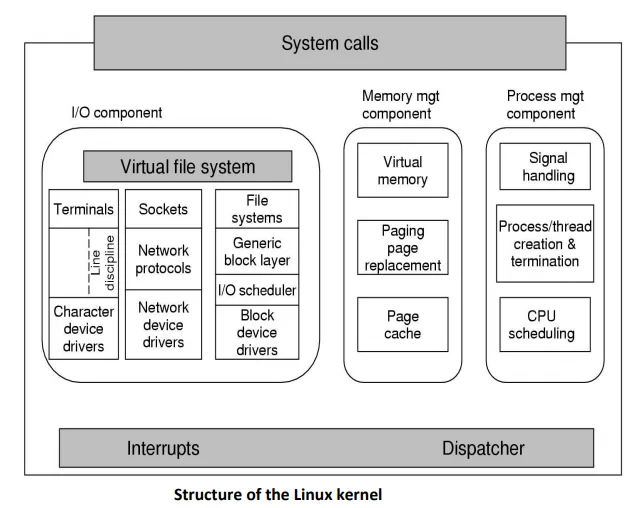
Three choices mark Linux’s architectural design. Namely, i) a monolithic kernel: core services live in one privileged binary, and loadable kernel modules (LKMs) add drivers at runtime, hence one kernel image serves any hardware; ii) asymmetric stability: the maxim “never break userspace” keeps decades-old binaries running, whereas in-kernel interfaces promise nothing and drivers must live in the kernel’s source tree and move with it; and iii) portable C: the tree runs beyond x86 on ARM and RISC-V. Tanenbaum publicly judged the first choice obsolete in 1992, arguing microkernels had already won, yet the monolithic tree outlived every microkernel rival on the server.
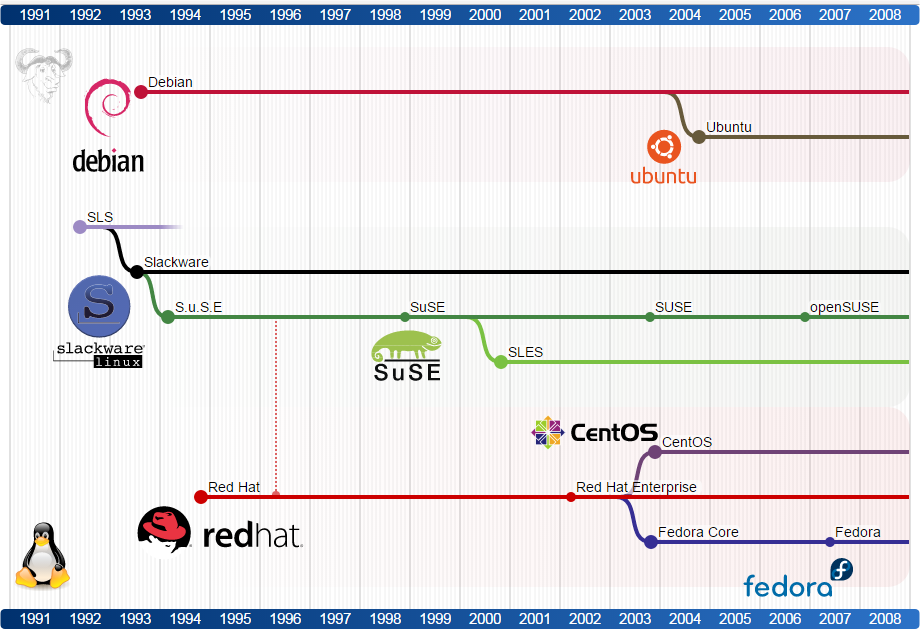
A Linux distribution (Linux distro) bundles the kernel with a curated user space, including the utilities and shell, libraries, configuration defaults, and package manager that turn a bare kernel into a bootable, usable system. The kernel alone starts PID 1 and stops concerning itself with what runs above. Everything a user touches, from the shell to the init system running as that PID 1, is hence the distribution’s choice rather than Linux’s. Most install systemd whereas slim distros such as Alpine choose lighter inits. Early distros such as Slackware (1993), Debian (1993), and Red Hat Linux (1995) laid the groundwork, and every major distro today descends from one of these lines.
The differences among distributions nonetheless run shallow, as every distro shares the kernel’s syscall ABI (§602#3.1) and honours POSIX and the FHS. What fragments is user space, which glibc and which library versions, so a binary built on one distro may not find its lib. on another. Meta-tools (e.g. snap, flatpak) thus bundle an application’s dependencies and lean on the kernel alone. What distinguishes distributions in practice is the package manager and the release policy. For example, Debian ships .deb packages via apt, and releases roughly every two years only when its testing pool is judged stable.
Ubuntu (2004, Canonical) rebuilds from Debian on a fixed cadence, where a release arrives every six months and a long-term support (LTS) release every two years (22.04 is April 2022, an LTS). Its LTS wins where certification matters. For instance, vendor stacks (e.g. nvidia/cuda with the pytorch images atop it), CI runners (e.g. GitHub Actions’ ubuntu-latest), and cloud images (e.g. EC2’s Amazon Machine Images) all ride it, while Debian still bases the official language and database images (e.g. python, postgres). Either way a distro arrives as a Docker base image and runs on any host, and Docker Desktop supplies a hidden Linux VM on macOS and Windows (§607#2.2).
II
2.1. Kernel
A kernel is a compiled binary (i.e. C, with Rust accepted into Linux since 6.1) built for a specific CPU architecture which remains resident for the lifetime of the machine, managing hardware on behalf of user programs: process scheduling, memory management, file systems, networking, and device control. It maintains all system state in C structs: what programs run (i.e. processes), where they live in memory (i.e. pages), and what they read/write (i.e. file descriptors). While it manages hardware through interrupt handling, device registers, and DMA, its codebase has architecture-specific code (e.g. arch/x86/, arch/arm64/) alongside portable C code (e.g. kernel/, mm/, fs/).
At power-on, firmware (BIOS/UEFI) performs the power-on self-test (POST) and hands over to a bootloader (e.g. GRUB), which loads the kernel image into RAM. The kernel’s start_kernel() then runs once, installing the trap table and syscall entry point, starting the scheduler and page allocator, probing devices, and mounting the root file system (first an initramfs, a temporary in-RAM filesystem carrying the drivers and tools needed to reach the real disk), before executing /sbin/init as PID 1. From that moment the kernel never launches a program of its own accord, as every later process descends from PID 1 by fork.
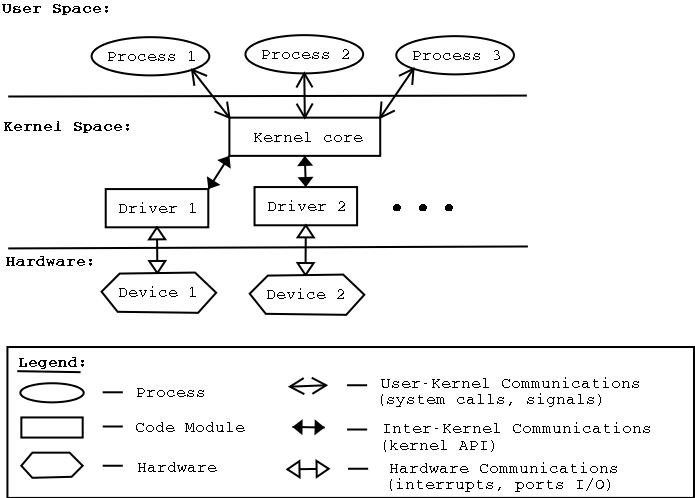
Despite its permanence, the kernel is not a process. It holds no PID and no run-queue entry, existing instead as a library of handlers mapped into the upper half of every process’s address space, so entering it is a mode switch within the current process rather than a context switch to another. It executes only when entered via a syscall, a fault, or an interrupt, and otherwise costs no CPU. The exceptions are kernel threads such as kswapd, which the kernel spawns for background housekeeping and ps shows in square brackets.
Its architecture varies in how much code runs privileged. Monolithic kernels (e.g. Linux) place all services in a single binary for fast in-kernel function calls, and so a single bug can crash the entire system. Microkernels (e.g. seL4) preserve scheduling, IPC, and memory management privileged, running other kernel components as user-space servers at the cost of IPC overhead. Hybrid kernels (e.g. XNU on macOS) keep performance-critical services (e.g. file system, networking, graphics) in kernel space. The distinction matters most for device drivers, code that translates generic I/O requests into hardware-specific operations, as they are highly crash-prone components.
2.2. Shell
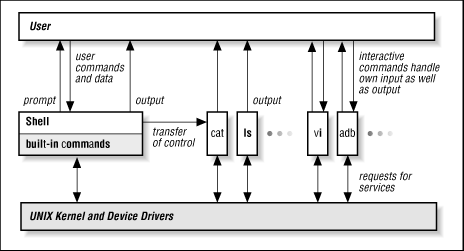
User programs reach kernel services only through system calls, which every process issues via library wrappers, and the user’s own point of entry is the shell, a command interpreter that parses input and dispatches the corresponding syscalls. The shell is a user-space process which repeatedly reads a command, forks a child, execs the binary, and waits for completion. CLI shells (e.g. Bash, Zsh) build on this loop with scripting, I/O redirection, job control, and process substitution. A pipeline such as ls | grep foo compiles into the target syscalls: fork(), pipe(), dup2(), and exec(), orchestrated by the shell before any program executes. Graphical desktop environments (e.g. Aqua, GNOME) expose the same interface visually.
Before any fork, the shell rewrites the command line through a fixed sequence of expansions. Parameter expansion replaces $HOME with the variable’s value, command substitution replaces $(git branch) with that command’s output, and pathname expansion (globbing) replaces *.py with matching file names, so the program receives finished argument strings and never sees the notation. Variables are local to the shell process until export marks them as environment variables, a key=value block that execve() hands to every child, which is how PATH reaches each program the shell launches. The inheritance runs one way only, as a child may alter its own copy but never the parent’s.
A user today opens not the shell but a terminal emulator (e.g. Ghostty, iTerm2), a GUI application that emulates the hardware terminals of the 1970s (e.g. the VT100, whose escape codes survive). Its role is presentation, as it draws glyphs, translates keystrokes into bytes, and interprets escape sequences for colour and cursor movement, whereas the shell runs inside as a child process wired to it through a pseudo-terminal (pty). The kernel’s pty device relays bytes both ways, so the emulator never parses a command and the shell never draws a pixel.
2.3. System Call
User code executes in user mode and enters the kernel through a privilege transition. There are three causes: i) system call (syscall): an intentional request by a program (e.g. write(), fork()), implemented via a trap instruction (e.g. syscall on x86-64); ii) fault: a synchronous exception raised by the CPU during instruction execution (e.g. page fault, division by zero), usually restartable once the kernel resolves the cause; iii) interrupt: an asynchronous signal from hardware (e.g. disk I/O completion, timer tick), whose handlers acknowledge the device and defer the rest (a softirq in Linux), and whose timer tick (every 1-10 ms) is what lets the kernel preempt running programs.
The syscall lifecycle on Linux x86-64 proceeds as follows. The program calls a libc wrapper (e.g. write()), which places the syscall number in rax (1 for write) and arguments in rdi, rsi, rdx, then executes the syscall instruction. The CPU saves the instruction pointer (RIP → RCX) and flags (RFLAGS → R11), switches to kernel mode, and jumps to the entry point registered in MSR_LSTAR. The kernel indexes into a syscall table by the number in rax, dispatches the handler (e.g. sys_write), places the return value in rax, and executes sysret to restore user mode. The program resumes unaware of the privilege transition.
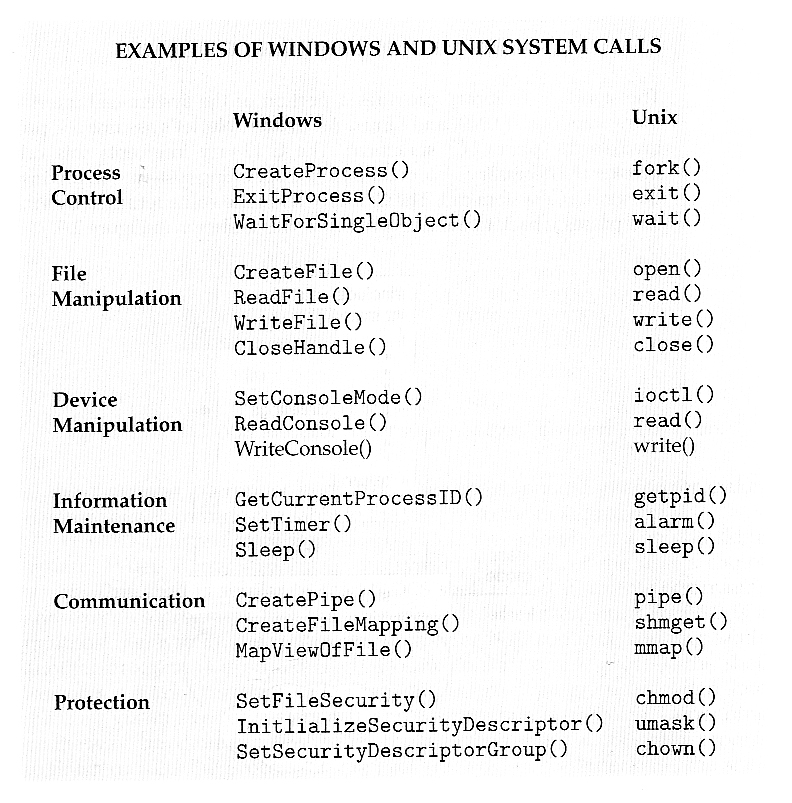
Standard libraries (e.g. libc) wrap these register conventions and trap instructions into portable function signatures, so programmers never issue syscalls directly. For example, C’s printf(), for instance, formats and buffers in user space, then hands the bytes to write(). Python’s print() sits a layer above, chaining through CPython’s C runtime into the same libc. Windows exposes the same functionality through WriteFile() with a distinct ABI and trap mechanism (syscall on x64, int 0x2e on early NT, sysenter from XP onward). Cross-platform portability is achieved via standardised APIs (e.g. POSIX) or runtime layers (e.g. JVM, Python interpreter).
Linux x86-64 defines ~450 system calls, each identified by a number in a syscall table spanning process control (fork(), execve()), file operations (open(), read()), memory management (mmap(), brk()), and networking (socket(), connect()). Fast syscalls like getpid() return immediately. Blocking syscalls like read() or accept() may suspend the calling process, as the kernel marks it as waiting and schedules another until hardware signals completion via an interrupt. Each mode switch costs roughly 100-1000 ns, which is why performance-sensitive code minimises crossings through buffered I/O, vectored operations (readv()/writev()), or batching interfaces like io_uring.
The boundary is crossed in the other direction by signals, the kernel’s only upcall to a process. When a fault, a timer, or another process warrants notification, the kernel marks the signal pending and, on the target’s next return to user mode, diverts execution into the registered handler before resuming where it left off. Ctrl-C is the everyday instance, as the pty driver turns the keystroke into SIGINT for the foreground process group. Every keystroke thus completes one circuit, from emulator to shell to kernel and back to the prompt, and each layer speaks only to its neighbours, so any one of them, emulator, shell, or kernel, may be swapped without the rest noticing.
III
3.1. Process
A program (§602#2.1) is a static entity, machine code and initial data laid out in an executable file that computes nothing until granted a processor and memory, and granting them is the OS’s work. A process (i.e. resource-owning unit) is the kernel’s abstraction of one execution of a program, providing an isolated address space and its own kernel resources, so a single program may run as several processes at once, each with its own state. A thread (i.e. scheduling unit, the smallest unit of execution the kernel dispatches) shares the process’s address space and fd, but maintains its own stack, PC, SP, registers, and flags, to enable concurrent execution without duplicating the address space. In Linux, both are represented by a single task_struct (i.e. process control block), where thread(s) in the same process simply point to the same mm_struct and files_struct. The distinction between the two is therefore structural rather than fundamental, while all processes always begin with a single main thread.
Creating a process from scratch would require allocating a fresh address space, page tables, and fd table. Unix avoids this with a two-step mechanism. i) fork() (kernel/fork.c) duplicates the calling process via copy-on-write (CoW), producing a child with a new PID that shares the parent’s pages until either side writes, where both fork and pthread_create() reach the kernel as clone(), whose flags select what parent and child share, a copied address space making a process and a shared one a thread; ii) The child calls exec() to load a new program, and the parent calls wait() to block until the child terminates; For example, when a user types ls, the shell forks → child execs /bin/ls (i.e. replaces the shell code with the ls binary) → parent waits → next prompt. A terminated child whose parent has not yet called wait() is also known as a zombie process.
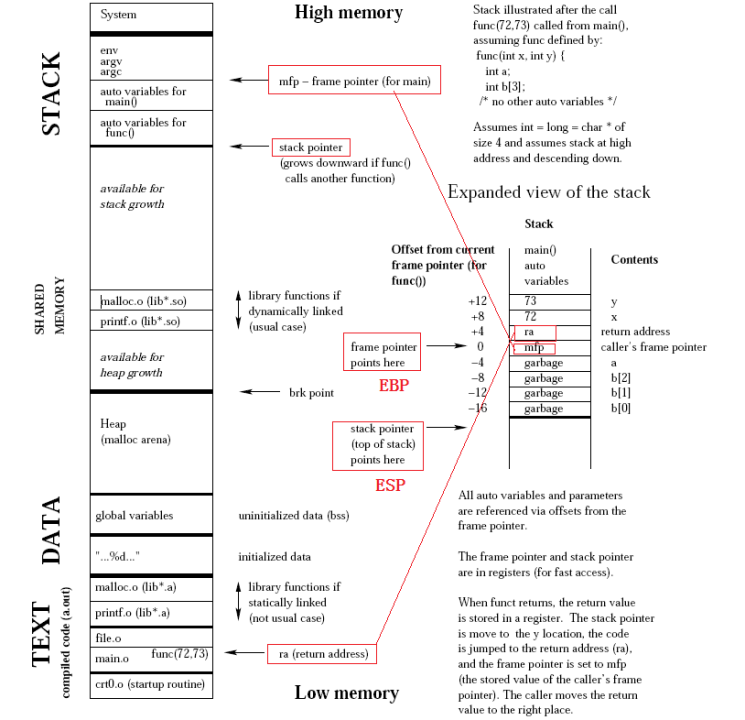
Specifically, exec() reads the executable header (e.g. ELF, §602) and maps its segments into the process’s (virtual-) address space. i) text: machine code, read-only and shareable via CoW; ii) data/BSS: initialised and zero-initialised global and static variables; iii) heap: growing upward via brk() / mmap(); iv) stack: growing downward for local variables and function frames; Notice that dynamically linked shared libraries are mapped between heap and stack by the runtime linker (ld.so), allowing multiple processes to share a single copy in physical memory (§602). Execution then begins at the entry point _start, which initialises the C runtime and calls main.
Once created, each thread advances through a life cycle of mutually exclusive states: new, ready (queued for CPU), running (actively scheduled), waiting (blocked on I/O or synchronisation), and terminated. Each transition corresponds to a field update in the thread’s task_struct. For example, read() on a slow device moves the thread from running to waiting; the device interrupt moves it back to ready. The kernel organises threads by state into queues, maintaining a ready queue for threads awaiting CPU time and wait queues for those blocked on events. On multicore systems, the scheduler keeps per-core ready queues and periodically rebalances load.
The CPU scheduler determines which ready thread to dispatch on each core. Cooperative scheduling relies on threads voluntarily relinquishing the CPU (via yield(), I/O, or sleep), so a thread that never yields starves all others. Preemptive scheduling, adopted by all modern OSes, removes this dependency via the hardware timer interrupt. Each decision triggers a context switch that saves the current thread’s CPU state into its task_struct and restores the next thread’s. Intra-process switches are inexpensive, but inter-process switches require a page table swap and TLB flush, reaching roughly 1-10 μs with the cache pollution they leave behind. How long a thread runs before preemption is bounded by the same numbers, as the slice must dwarf the ~1-10 μs switch for overhead to stay negligible yet remain short enough that most CPU bursts end within one of their own accord (~80%, Silberschatz’s rule of thumb), which is why time slices sit at 1-100 ms. Selecting which thread to run next is therefore a policy decision.
The classical scheduling algorithms formalise its choice, each a selection rule optimising a different objective over the ready set. Round robin (RR) cycles through the ready queue with a fixed time quantum, i.e. selecting the least recently dispatched thread. Shortest Job First (SJF) selects the smallest expected CPU burst, minimising average wait at the risk of starving long jobs. Highest Response Ratio Next (HRN) mitigates this via $(w + s) / s$ ($w$ = waited, $s$ = est. service time), so longer-waiting threads eventually win. Priority scheduling dispatches the highest-priority thread, risking starvation unless aging boosts lower priorities. Multi-level feedback queues (MLFQ) unify these with multiple queues that dynamically adjust priority based on observed behaviour (I/O-bound promoted).
In practice, Linux synthesises these ideas into a fair scheduler. The Completely Fair Scheduler (CFS, kernel/sched/) maintained a per-thread virtual runtime that advances inversely with its weight (i.e. set by the nice value, where lower nice means higher weight), dispatching the thread with the smallest value via a red-black tree ($O(\log n)$). The EEVDF (Earliest Eligible Virtual Deadline First) scheduler replaced CFS in kernel 6.6 (2023), adding a deadline component to reduce latency for interactive tasks while keeping fairness. Both operate under the default SCHED_NORMAL policy; real-time tasks use SCHED_FIFO or SCHED_RR with fixed priorities that unconditionally preempt normal threads.
- …
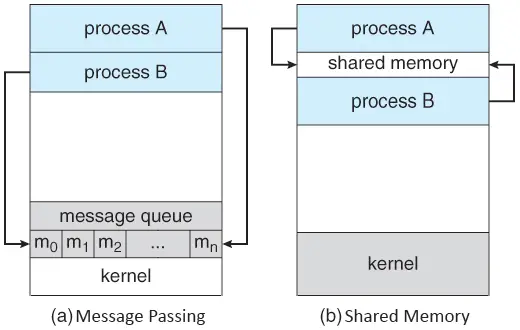
Once scheduled and running, processes may need to exchange data across their isolated address spaces. The kernel facilitates this through inter-process communication (IPC). Message passing delegates transfer to the kernel via pipes, Unix domain sockets (UDS), or message queues. Unlike TCP over loopback, UDS bypasses the network stack, addressed by a file path (e.g. /var/run/docker.sock). Shared memory maps the same physical pages into multiple address spaces, avoiding the copy. Message passing is simpler (the kernel handles synchronisation), but shared memory offers higher throughput since data never crosses the kernel boundary. Message passing reaches these through file descriptors, whereas shared memory takes one only to establish the mapping, after which access is ordinary loads and stores.
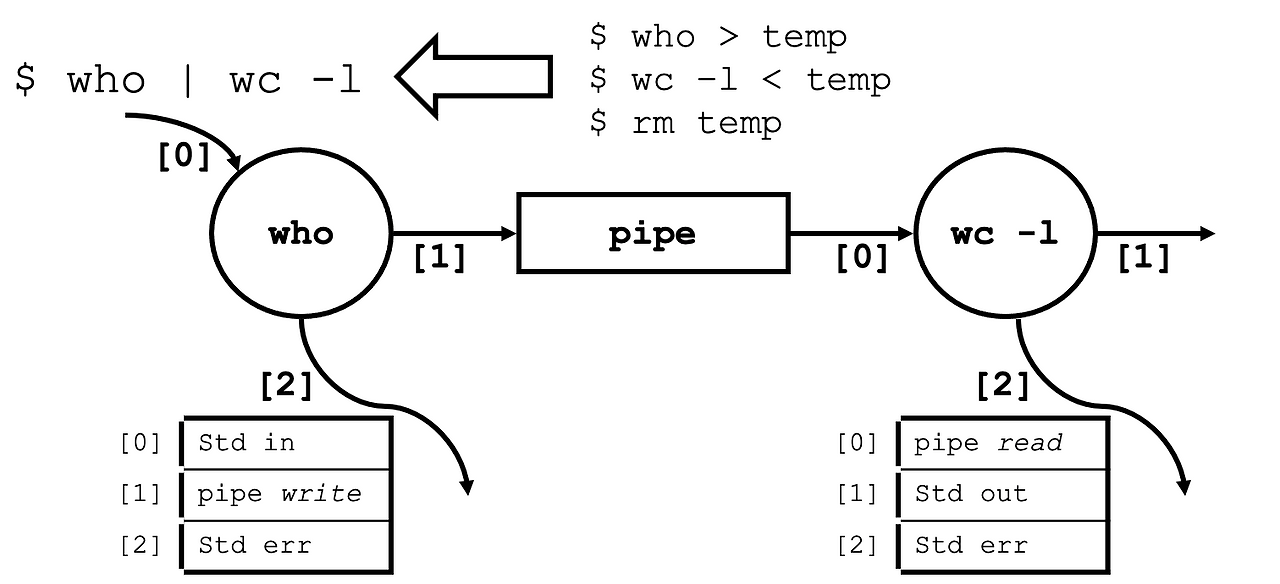
fork() duplicates the parent process’s fd table, and exec() preserves it, so a child process inherits all open file descriptors. This inheritance is the mechanism behind shell I/O redirection and pipes, where pipe() creates a pair of fds connected by a kernel buffer and dup2(oldfd, newfd) copies one fd onto another slot, replacing what was there. To build ls | grep foo, the shell creates a pipe, forks twice, uses dup2() to replace each child’s stdout or stdin with the appropriate pipe end, then calls exec() in each child. Neither ls nor grep contains any redirection logic; both simply read from fd 0 and write to fd 1 as usual.
3.2. Virtual Memory
A linker bakes absolute addresses into the binary (§602#2.1), and a program consumes them densely, as code falls through to the next instruction and arrays are indexed off a base. Run directly on physical memory (a flat, byte-addressable array, §601), a process is therefore one immovable contiguous block, and memory fragments into holes too small to reuse as such blocks come and go. Virtual memory dissolves both constraints with one indirection, a hardware translation layer (e.g. MMU + TLB) through which each process sees a large, contiguous address space of its own rather than physical memory. Modern general-purpose OSes leverage the abstraction, where the kernel maintains the mapping for the hardware to enforce it on every memory access, as it allows i) isolation: one process cannot access another’s memory; ii) sharing: common pages mapped without duplication, with CoW deferring copies until a write occurs; and iii) overcommitment: total virtual allocation may exceed physical capacity, backed by disk.
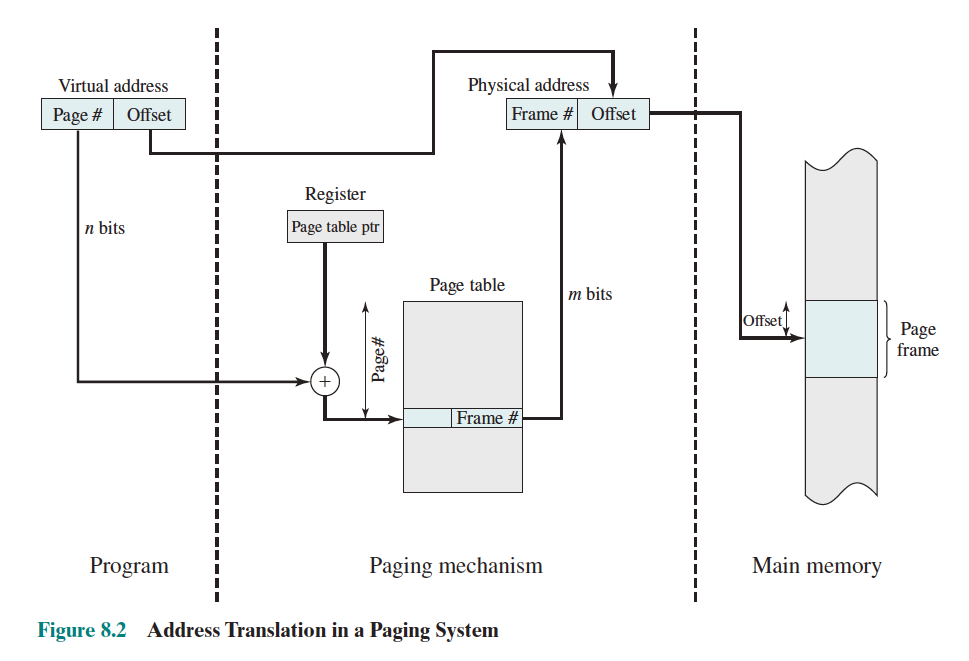
The kernel partitions virtual address space and physical memory into fixed-size pages and frames, respectively, typically 4 KB. Each process $i$ is given a page table that materialises a partial function $\pi_i : V \rightharpoonup P$ from virtual page numbers to physical frame numbers, which restates the three guarantees above formally, i.e. isolation means process $i$ reaches only $\mathrm{im}(\pi_i)$, sharing and CoW are kernel-controlled overlaps of the images, and overcommitment means $\sum_i \lvert \mathrm{dom}(\pi_i) \rvert$ may exceed the number of physical frames. On each memory access, the MMU splits the virtual address into a page number and an offset, looks up the page number in the table, and replaces it with the physical frame number. Each page table entry (PTE) is per-page metadata that records the physical frame number, a present bit that triggers a page fault, and permission flags (rwx). On context switch, the kernel updates the page table register, e.g. {x86: CR3, ARM: TTBR}, to point to the new process’s table.
Fixed-size paging naturally eliminates external fragmentation at the cost of internal fragmentation. However, the tables also reside in physical memory, and a naive flat table becomes impractical as the address space widens. For instance, let $N$, $P$, and $E$ denote the virtual address width, page size exponent, and PTE size exponent, respectively. A flat table with one entry per page costs $2^{N - P + E}$ B per process. On x86-64 (i.e. $N = 48$, $P = 12$, $E = 3$), this yields $2^{39}$ B = 512 GB of pre-allocated memory per process, regardless of actual usage, which makes a flat table prohibitive.
-
Stallings, Operating Systems: Internals and Design Principles, Fig. 8.2
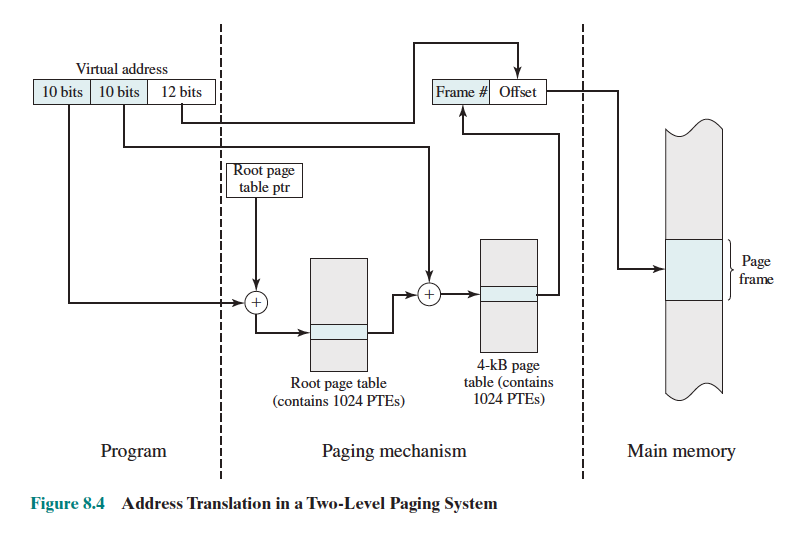
Multi-level page tables solve the flat table problem by partitioning the virtual address into multiple index fields, each selecting an entry in a successively deeper table. Only subtrees covering populated regions are allocated, making each process’s page table cost proportional to actual usage. x86 (32-bit) uses a 2-level hierarchy, requiring two memory reads per translation; x86-64 extends this to 4 levels for wider address spaces. However, multiple memory reads per translation is still expensive, so the TLB (§601#1.3) caches recent translations. It is effective because programs exhibit strong locality: a single 4 KB page holds many instructions, so consecutive accesses frequently result in a TLB hit. A TLB miss triggers the full page table walk, and a TLB flush invalidates all cached entries.
Physical frames are not allocated until first accessed, a strategy called demand paging. When a process touches an unmapped page, i.e. evaluates $\pi_i$ where it is not yet materialised, the CPU raises a page fault (mm/memory.c) and the kernel extends the map by allocating a frame, either zero-initialising it or loading content from disk. If physical memory is exhausted, a page replacement policy (e.g. FIFO, LRU, Clock) evicts a victim frame. While this permits overcommitment, sustained faulting leads to thrashing.
In practice, virtual memory and file I/O are tightly coupled. The page cache (mm/filemap.c) buffers disk blocks in RAM, so repeated reads of the same file resolve from memory rather than disk. mmap() (mm/mmap.c) turns page faults into file reads, allowing np.memmap to access a large on-disk array as if it resided in memory, with the kernel paging in only the blocks actually touched. Swap inverts this relationship, using disk as a backing store for memory pages with no file origin. In all three cases, the kernel moves data between RAM and disk in page-sized units, making the boundary between virtual memory and the file interface thinner than it appears.
3.3. File System
In Unix, a file is an unstructured sequence of bytes with no format imposed by the kernel, and a file system is the software layer which organises files into a hierarchy of named paths, each associated with metadata (e.g. size, ownership, permission). The indirection (i.e. abstraction) between names and raw bytes is what maps files onto the raw blocks of a disk (§601#1.4), though the same interface extends to memory-backed (tmpfs), network-backed (NFS), and kernel-generated (/proc) file systems. Therefore, the kernel is format-agnostic, file extensions (e.g. .txt, .py) are merely a user-space convention, and file(1) inspects magic bytes in the content to determine its type.
Programs do not access a file directly but through a file descriptor (fd), which open() issues for a path, socket() for a connection (4.2BSD, 1983), and pipe() for a pipe’s two ends. Creation varies by endpoint, taking a path, an address, or nothing at all, whereas use is invariant, as read(), write(), and close() treat every fd alike. The kernel tracks it through three layers of data structures: per-process fd table $\to$ system-wide open-file table $\to$ in-kernel file object, and it returns the lowest available integer, so the first three fds on a fresh process are 0 (standard input), 1 (standard output), 2 (standard error) by convention (POSIX).
read(fd, buf, n) receives up to $n$ bytes and write(fd, buf, n) sends them. Both return the number of bytes transferred, which may be less than requested (a short read/write), and read() returning 0 signals end-of-file (EOF). By default, read() on a source with no available data (e.g. an empty pipe) blocks the calling process until bytes arrive or the write end closes. lseek() repositions the fd’s offset for random access, and close() releases the fd, decrementing the reference counts at each layer. In practice, standard libraries (e.g. C’s stdio) wrap fds in buffered handles (e.g. FILE*), and higher-level languages (e.g. Python’s open()) add further abstraction.
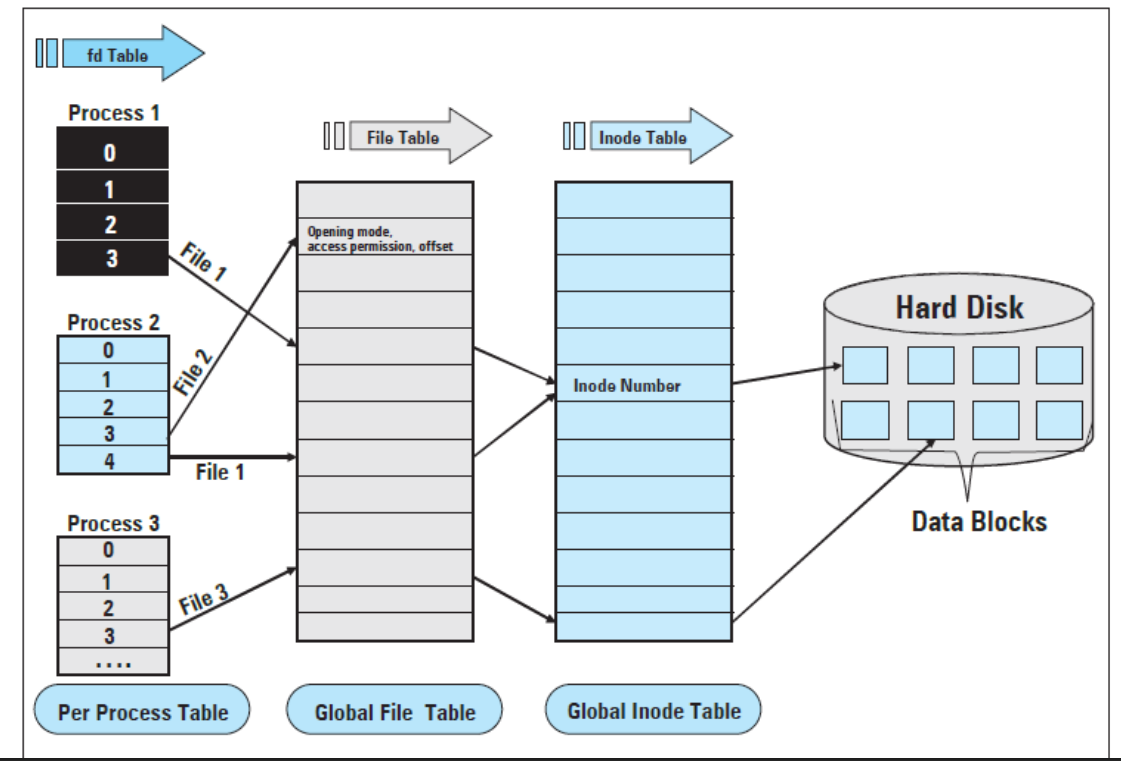
Given the uniform interface applicable to all I/O endpoints, each back-end has its own file system implementation. Specifically on disk, a file is represented as an index node (inode) and data blocks. The on-disk inode is a per-file struct storing metadata and pointers to data blocks (fixed-size chunks, typically 4 KB) that hold the file’s bytes; the kernel loads it into memory when the file is opened, producing the in-kernel file object in the three-layer model above. Just as a flat page table cannot scale to a wide address space, a fixed set of direct pointers cannot address a large file. ext2 solved this with 12 direct pointers plus single-, double-, and triple-indirect blocks; ext3 retained this scheme and added journaling, yielding a maximum file size of $(12 + p + p^2 + p^3) \times b$, where $b$ is the block size and $p = b/4$ the number of pointers per block. With $b = 4$ KB and $p = 1024$, this gives ~4 TB, the addressing scheme’s bound, though other 32-bit metadata caps ext3 file size at 2 TiB in practice. ext4 replaced indirect blocks with extents, raising the limit further.
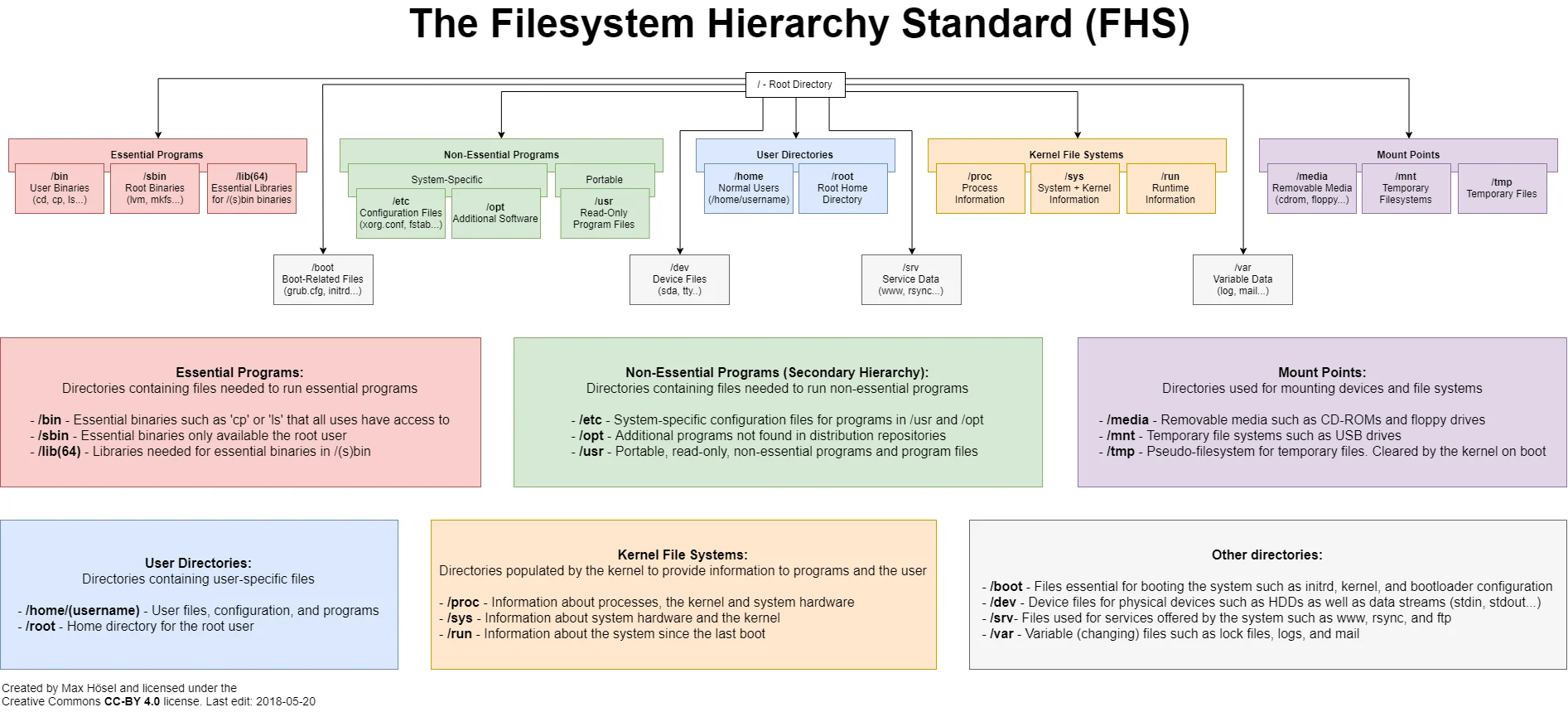
The inode does not store the file name. A directory is a file encoding a finite map from names to inode numbers; directories referencing other directories form the tree hierarchy (/, /home, /usr, …) that users navigate daily. On Linux, the Filesystem Hierarchy Standard (FHS) standardises this layout (e.g. /bin for essential binaries, /etc for configuration, /home for user directories). Because names live in directory entries rather than inodes, multiple names can reference the same inode and renaming requires only updating the directory entry. A hard link is a second name mapping to the same inode, making the map many-to-one; the inode tracks a link count, the size of its preimage, and the data is freed only when it reaches zero. A symbolic link (symlink) is a separate inode that stores a target path; unlike a hard link, deleting the target leaves a broken symlink. Each inode encodes a 9-bit permission field (read/write/execute $\times$ owner/group/other) checked on every operation. In ls -l output, a leading character indicates the inode type (d for directory, l for symlink, - for regular file), followed by the nine permission bits (e.g. drwxr-xr– for a directory readable by all, executable by owner and group, writable only by the owner).
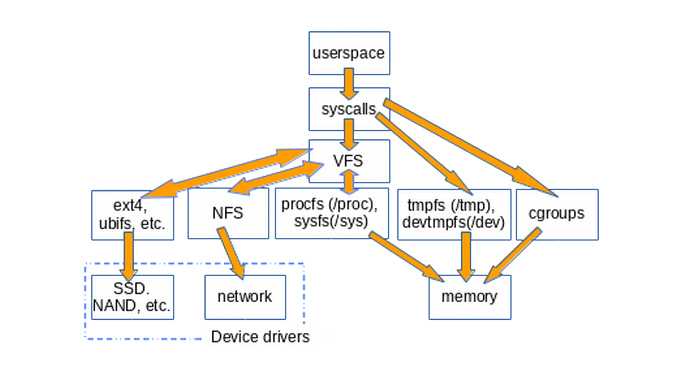
The preceding paragraphs describe one file system on one disk, but a single machine may mount ext4 on its local disk, NFS for a remote share, and tmpfs for scratch space simultaneously. Even on the same back-end, different file systems embody different design tradeoffs (e.g. ext4 vs btrfs vs XFS). Without a common dispatch layer, every syscall would need to know which file system it is talking to. A virtual file system (VFS) solves this by providing a single abstraction layer through which all file system operations pass. The in-kernel file object in the three-layer model is a VFS object, populated from the on-disk inode for disk-backed files or synthesised by the kernel for pipes, sockets, and pseudo-filesystems. Each filesystem registers a file_operations struct whose function pointers implement open, read, write for that format; VFS dispatches every syscall through these pointers. Mounting a FAT32 USB drive alongside APFS (Apple’s default disk file system) requires no change to user-space code.
Every process resolves its binaries, libraries, and data relative to a root filesystem, and pivot_root() can change which filesystem tree a process sees as /. A union file system (e.g. OverlayFS, merged in Linux 3.18) stacks multiple directory trees, typically read-only lower layers and a single read-write upper layer, into one merged view via copy-on-write. Both primitives underpin containers (§607#2.1-2.2).
The fd abstraction grew from files (disk I/O) $\to$ pipes (inter-process byte streams) $\to$ sockets (network endpoints, §605#2.2) $\to$ devices, each extending the same read/write interface to a new domain. In Unix, a file is therefore any I/O endpoint the kernel exposes through a file descriptor. Device drivers bridge this abstraction to real hardware by implementing two contracts: upward, they conform to the kernel’s file interface so that user-space sees a file descriptor; downward, they speak the device’s register protocol, handle its interrupts, and manage its DMA buffers. When installed, a driver registers with the kernel’s bus subsystem (e.g. PCI), probes the device, and exposes it as a file in /dev (e.g. /dev/sda for a disk, /dev/nvidia0 for a GPU). Pseudo-filesystems like /proc (originating in 8th Edition Unix, 1984) and /sys expose live kernel and hardware state through the same interface. These files have no backing data on disk; the kernel generates their contents dynamically on each read(), making system introspection as simple as reading a file.
 me.bat
I gathered words solely for my own purposes without any intention to break the rigour of the subjects.
I also prefer eating corn in spiral .