
 (C:)
(C:) cs300
cs300 A Survey on the Bichon Frisé
Operating System
A digital computer without an operating system (OS) is just bare metal. The OS is often overlooked, but this is a crucial invention that supports nearly all modern computing. We encounter it naturally when moving from high-level code to low-level hardware instructions.
- https://www.youtube.com/watch?v=ISJ44S5sZu8
- https://www.youtube.com/watch?v=HbgzrKJvDRw
- https://www.youtube.com/watch?v=D26sUZ6DHNQ (UDS: unix domain sockets)
- https://www.youtube.com/watch?v=XNGfl3sfErc
- https://www.youtube.com/watch?v=H01FkDtllwc
I
1.1. Evolution
The earliest generation of electronic computers (1940s-50s), such as the ENIAC, were programmed manually in pure machine code by rewiring circuits or feeding in punched cards. Programs ran in isolation, required laborious setup, and left machines idle between jobs. The concept of an OS emerged in the 1950s with batch processing systems which grouped similar jobs for sequential execution without manual intervention. A key example is GM-NAA I/O, developed for the IBM 701. The 701 was programmed in assembly, used control cards to interpret jobs and automate execution, and was later adapted to support high-level languages such as Fortran (1957).
The 1960s marked a shift toward time-sharing systems (TSS) and multiprogramming, which admitted concurrent execution of multiple programs residing in memory by rapidly switching the CPU among them. This trajectory produced Multics, a pioneering TSS jointly built by AT&T Bell Labs, GE, and MIT to support a robust, multi-user computing environment. However, discontent with its complexity prompted researchers at Bell Labs to develop Unix in the early 1970s. This newer and simpler OS incorporated a modular kernel, hardware abstraction, and multi-user support, in which these principles remain central to modern operating system design.
The 1980s ushered in the era of personal computing, shifting OS development from command-line interfaces (CLI) to graphical user interfaces (GUI) to improve accessibility for non-technical users. Microsoft introduced MS-DOS in 1981, a single-tasking CLI-based OS, followed by successive versions of Windows that adopted cooperative and later preemptive multitasking. Around the same time, Apple’s Macintosh OS (aka. macOS) brought the GUI into mainstream. In the 1990s, Linux emerged as a free and open-source Unix-like alternative. Rooted in Unix philosophy, it became a foundation for innovation across servers, mobiles, and embedded systems.
1.2. System Call
A modern OS enforces a hardware-supported partition between user mode (unprivileged) and kernel mode (privileged), preventing unprivileged programs from directly accessing critical hardware resources. Application programs therefore run as unprivileged processes and must request OS services (e.g. file I/O, memory allocation) through controlled interfaces. System programs also reside in user space but provide infrastructure that translates user instructions into kernel requests. sudo (super-user do) allows a non-root user to execute a command with elevated privileges.
As illustrated below, standard libraries (e.g. libc) abstract the complexity of invoking system calls directly. When a program requires privileged functionality, it calls a library wrapper (e.g. write(…)), which populates registers and executes a syscall instruction to trap into the kernel. System calls are the well-defined entry points into kernel mode, implemented via software interrupts or CPU-specific trap mechanisms, ensuring only trusted kernel code touches hardware or protected memory.
On Linux x86-64, for instance, libc’s write() places the syscall number (1) in rax and its arguments in rdi, rsi, rdx, then executes syscall. The kernel validates, performs the I/O, and returns to user space. Windows exposes the same functionality through WriteFile() with a distinct ABI and syscall interface. Cross-platform portability is achieved via standardised APIs (e.g. POSIX) or runtime layers (e.g. JVM, Python interpreter). In Python, os.write(1, b”Hello”) chains through CPython’s C layer into libc’s write(), which issues the syscall instruction, so the programmer never touches registers directly.
section .data
      msg        db  "Hello", 10     ; "Hello\n"
      msg_len   equ $ - msg       ; Length of the message

section .text
      global _start

_start:
      ; write(stdout, msg, msg_len)
      mov     rax, 1                      ; syscall: write
      mov     rdi, 1                       ; file descriptor: stdout
      mov     rsi, msg                  ; buffer address
      mov     rdx, msg_len          ; number of bytes to write
      syscall

      ; exit(0)
      mov     rax, 60                    ; syscall: exit
      xor       rdi, rdi                     ; status = 0
      syscall
1.3. Kernel
The kernel is the innermost layer of the OS, executing at the highest privilege level and mediating all access to hardware and protected resources. Its core responsibilities include CPU scheduling, memory management, inter-process communication (IPC), and device I/O. The dual-mode partition between user and kernel space is enforced by hardware (e.g. a mode bit in the CPU), and any privileged operation requires an explicit transition from user mode into the kernel via a system call.
The kernel’s architecture induces a fundamental trade-off between performance and fault isolation. Monolithic kernels (e.g. Linux) bundle all core services into a single privileged binary, enabling fast in-kernel function calls but increasing the risk that a single fault crashes the entire system. Microkernels (e.g. seL4) retain only minimal services (e.g. scheduling, IPC) in kernel space, delegating the rest (e.g. file systems, drivers) to user-space servers for stronger isolation at the cost of message-passing overhead. Hybrid kernels (e.g. XNU in macOS, Windows NT) occupy an intermediate point on this spectrum.
User programs interact with the kernel through two complementary interfaces. Standard libraries (e.g. libc) wrap system calls into portable function signatures, while shells act as command interpreters that parse user input and translate it into sequences of system calls. The names reflect this layered structure, the kernel sits at the centre and the shell wraps around it as the outermost interface exposed to the user. CLI shells such as Bash, Zsh, and Fish support scripting, I/O redirection, job control, and process substitution. On graphical systems, desktop environments such as GNOME (Linux), Finder (macOS), and Explorer (Windows) serve the same role visually. Note that terminal emulators (e.g. Ghostty, iTerm2) merely host shell processes and should not be confused with the shell itself.
```
II
2.1. Unix
Looking back at its origins, Unix emerged in 1969 at Bell Labs, when Ken Thompson and Dennis Ritchie repurposed a spare PDP-7 18-bit minicomputer to develop a lightweight, interactive operating system. Initially dubbed “Unics” (i.e. a pun on the earlier Multics), the system abandoned the complexity of its predecessor in favour of simplicity and modularity. Its adoption of a hierarchical file system (HFS), segmented memory, dynamic linking, and a minimal yet powerful API exhibited a design philosophy centred on composability, portability, and a clean separation of concerns between kernel-level mechanisms and user-space utilities.
A foundational abstraction in Unix was its uniform treatment of input/output. By representing all I/O resources (e.g. files, devices, and IPC endpoints) as file descriptors, Unix allowed disparate resources to be accessed via the same read/write interface. This “everything is a file” model, combined with the system’s use of plain-text config and output, made the environment very scriptable. Programs were inherently designed as small, single-purpose utilities that could be chained together using pipes (|). For example, the command cat log.txt | grep error | sort | uniq -c reads a log file, filters lines containing “error,” sorts them, and collapses duplicates into counts.
Another notable contribution was portability. In the early 1970s, Unix was rewritten from assembly into the C programming language, also created by Ritchie at Bell Labs. C evolved from the earlier B programming language (i.e. derived from BCPL) and introduced key features such as typed variables, structured control flow, and more direct memory manipulation. This decoupling from machine-specific assembly made Unix recompilable on a wide variety of hardware platforms, the first widely portable operating system, and the co-evolution of Unix and C unlocked a generation of system-level programming.
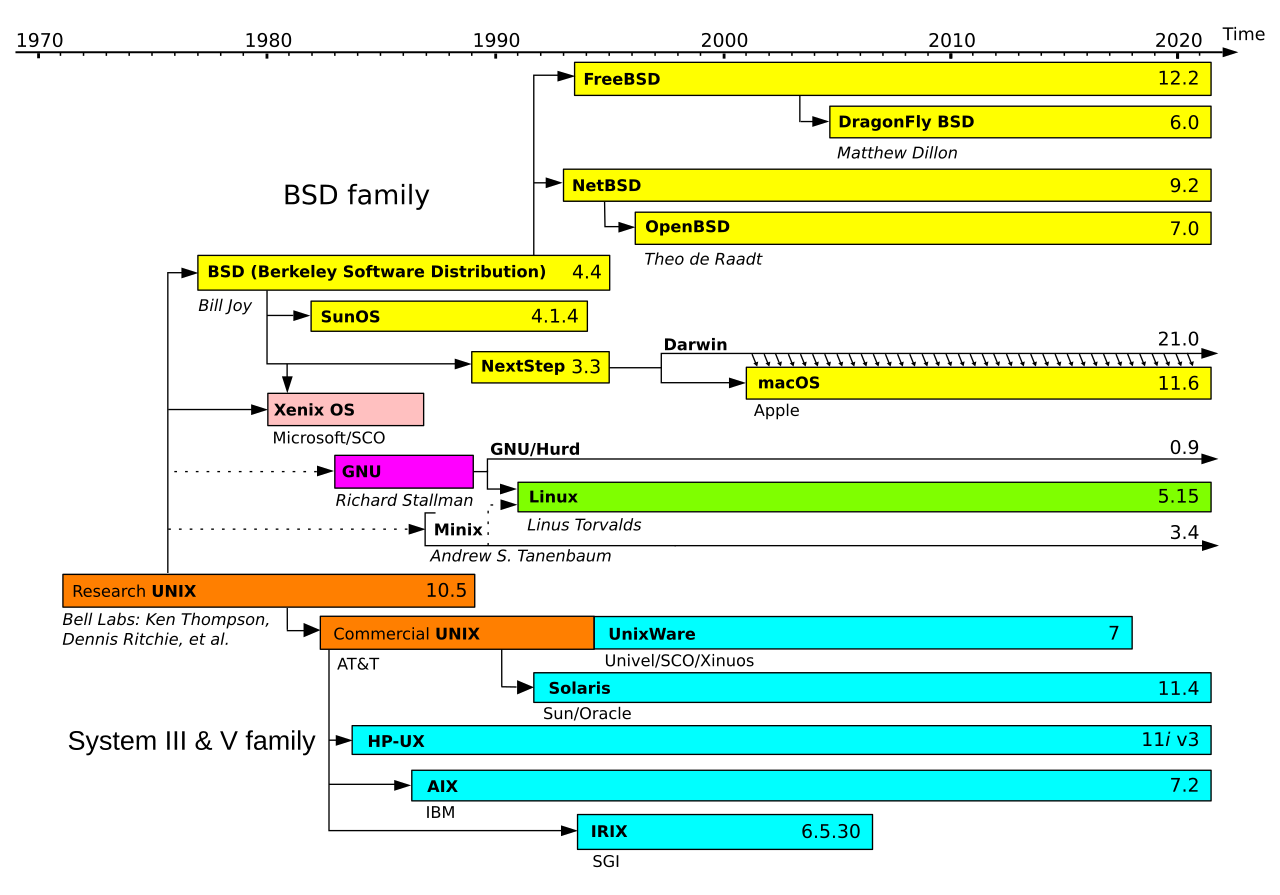
As AT&T was restricted by the 1934 Communications Act and a 1956 antitrust consent decree from entering commercial computing, Unix was freely or cheaply distributed and widely adopted in academia. One of its most influential offshoots was the Berkeley software distribution (BSD), launched in the late 1970s by Bill Joy and the Computer Systems Research Group (CSRG) at UC Berkeley. BSD began as a set of enhancements to AT&T Unix, but evolved into a full OS by the late 1980s. With DARPA funding, BSD merged key networking features including the first complete TCP/IP stack, and became a reference platform for early Internet development.
BSD’s permissive licence and technical maturity attracted commercial interest throughout the 1980s-90s. Its code was incorporated into systems such as SunOS by Sun Microsystems, Ultrix by Digital Equipment Corporation, and NeXTSTEP by NeXT Inc., and it laid the groundwork for enduring open-source projects including FreeBSD, NetBSD, OpenBSD, and DragonFly BSD. Its influence extends to modern platforms. Apple’s Darwin, the Unix core of macOS and iOS, combines the Mach microkernel with a FreeBSD-derived BSD layer. Microsoft integrated BSD-derived code into Windows networking, and its legacy persists in routers, embedded appliances, and gaming consoles such as the PlayStation 5.
As Unix variants proliferated, divergence in system calls, utilities, and behaviours broke software portability and interoperability. To resolve this, the IEEE introduced the Portable Operating System Interface (POSIX) standard in the late 1980s, specifying a consistent API, shell command set, and utility behaviours for Unix-like systems. Although POSIX did not fully unify all implementations (especially proprietary extensions), it established a solid baseline that greatly improved cross-platform compatibility. This standardisation not only helped unify the fragmented Unix landscape but also influenced the development of modern operating systems, including Linux and BSD derivatives.
2.2. Linux
Linux began in 1991 as a personal project by Linus Torvalds to build a free, Unix-like kernel for the Intel 80386 architecture. Inspired by MINIX (a teaching OS by Andrew Tanenbaum) and licensed under the GPL, it attracted contributions from developers worldwide and was paired with the GNU Project’s user-space tools (e.g. gcc, glibc, coreutils) to form a complete open-source operating system. Unlike proprietary Unix systems tied to specific vendors, Linux grew through a decentralised, community-driven model, a development approach that would later be mirrored by the open-source AI community (e.g. Hugging Face, PyTorch, llama.cpp).
Architecturally, Linux uses a monolithic kernel, integrating core services such as process scheduling, virtual memory, networking, and file systems into a single privileged binary. To balance this with modularity, it supports loadable kernel modules (LKMs) that allow dynamic insertion of drivers and extensions at runtime without rebooting. Written in portable C, Linux was quickly ported beyond x86 to architectures including ARM, PowerPC, and SPARC, and later incorporated features such as control groups (cgroups), namespaces, and pluggable schedulers that now underpin containerised ML training pipelines (e.g. Kubernetes on GPU clusters).
Though not derived from any Unix source tree, Linux closely follows POSIX standards and Unix design principles. By the early 2000s, it had displaced proprietary Unix as the dominant OS for servers and infrastructure. Today, it runs on everything from Android smartphones to all Top500 supercomputers, and serves as the default runtime for virtually all large-scale ML workloads. Cloud ML platforms (e.g. AWS SageMaker) run Linux-based containers, as do distributed training frameworks (e.g. DeepSpeed, Megatron-LM) and inference servers (e.g. vLLM, TGI), because its open-source nature and fine-grained hardware control make it the natural fit.
III
3.1. Process Management
Each process executes within its own isolated virtual address space, comprising distinct code, data, heap, and stack segments. The OS kernel maintains per-process metadata in a process control block (PCB), which records identifiers (PID/PPID), execution state, CPU registers, memory mappings, scheduling parameters, and open file descriptors. A process advances through a life cycle of mutually exclusive states, from new (creation), ready (queued for CPU), running (actively scheduled), waiting (blocked on I/O or synchronisation), to terminated (completed or killed).
The CPU scheduler, a core kernel component, manages transitions between these states and determines which ready process to dispatch next. Classical algorithms include round robin (fixed time slices), priority scheduling (fixed or dynamic priority queues), and multi-level feedback queues (MLFQ, which adapts priorities based on observed behaviour). Each scheduling decision is followed by a context switch that saves the current process state to its PCB and restores the next, incurring overhead from cache invalidation, TLB flushes, and pipeline stalls. Even single-core systems achieve concurrency by time-slicing across processes.
When multiple cooperating processes need to coordinate across isolated address spaces, the kernel provides inter-process communication (IPC) mechanisms. The two fundamental modes form a duality. Message passing delegates data transfer to the kernel via abstractions such as pipes, UNIX domain sockets, or System V message queues, trading throughput for isolation. Shared memory inverts this, allowing processes to map the same physical pages into their respective address spaces for high-throughput, low-latency communication at the cost of explicit synchronisation.
A thread is a lightweight execution unit within a process that shares the same virtual address space, enabling fine-grained parallelism with lower memory overhead and faster context switches than inter-process alternatives. Most modern OSes implement a $1 \colon 1$ threading model (e.g. NPTL) where each user thread maps directly to a kernel thread and is independently scheduled by the kernel.
3.2. Memory Management
Modern multi-process systems provide strong memory isolation, efficient resource sharing, and protection against fragmentation and out-of-memory (OOM) conditions. Early approaches fell short on all three fronts. Physical memory management (e.g. MS-DOS) offered limited protection, as any process with an invalid pointer could overwrite another’s memory. Segmentation introduced logical divisions (code, heap, stack) and some access control, but suffered from external fragmentation and offered limited flexibility for dynamic reallocation.
Virtual memory, implemented in cooperation with hardware, abstracts physical memory by providing each process with the illusion of a large, contiguous address space, decoupling logical layout from physical constraints. In turn, this enables protection, memory sharing (e.g. common libraries), and also copy-on-write (CoW) which delays duplication of pages until modification. The OS kernel divides the address spaces into fixed-size units, namely (virtual-) pages and (physical-) page frames. Each process maintains a page table (e.g. C struct) consisting of page table entries (PTEs), each of which contains metadata including physical page number (PPN) and its presence.
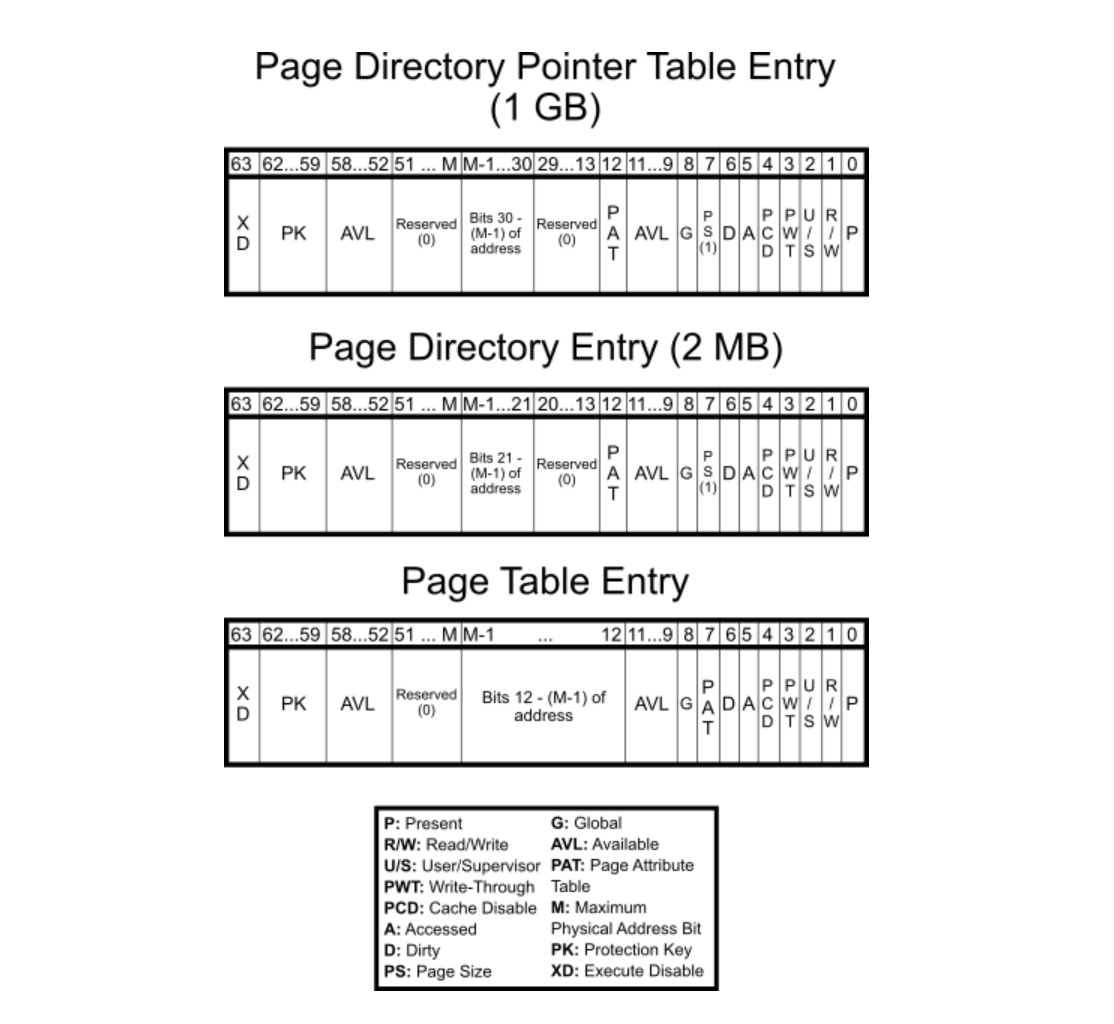
Given that the virtual address space size is $2^N$, where $N$ denotes the CPU’s bit-width, and the page size is fixed at $2^P$ B (commonly 4 KB, i.e. $P = 12$), the total number of pages per process is $2^{N - P}$. If each PTE occupies $2^E$ B (typically $E = 2$ for 4-byte entries or $E = 3$ for 8-byte entries), then the total memory required for a flat page table is $2^{N - P + E}$ B. The size grows rapidly with increasing $N$ and makes it impractical for 64-bit architectures. For example, with $N = 64$, $P = 12$ and $E = 3$, the table requires $2^{55}$ B or 32 PB per process. Even a 48-bit system would consume $2^{39}$ = 512 GB, making multi-level page tables (e.g. 4-level) essential.
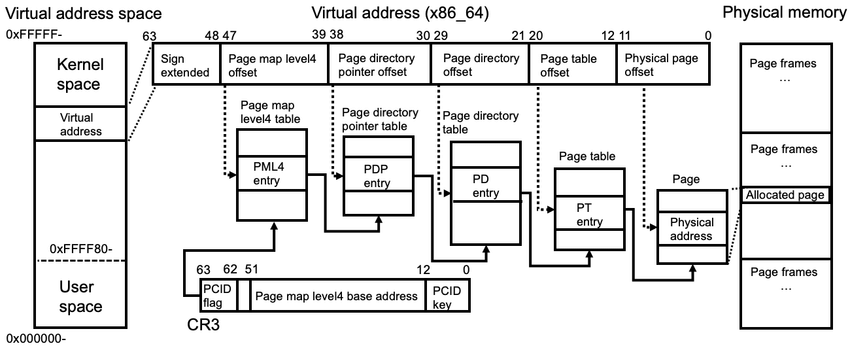
Modern CPUs employ a memory management unit (MMU) that traverses page tables during address translation. Embedded within the MMU is the translation lookaside buffer (TLB), a small, associative cache that stores recent address translations. Unlike L1/L2 caches, which speed up direct memory access, the TLB caches only address mappings to avoid repeated table walks. Many architectures partition the TLB into separate instruction (ITLB) and data (DTLB) caches to allow concurrent lookups. A TLB hit allows resolution within a single cycle, but a TLB miss yields a page walk followed by caching the result. Thus its size, associativity, and replacement strategy really matter.
At runtime, a page fault is triggered when a process accesses a page not currently backed by physical memory. The kernel responds by allocating a frame and filling it with the appropriate data either by zero-initialising a new page or loading content from swap space or memory-mapped files on disk. If physical memory is exhausted, a page replacement policy (e.g. FIFO, LRU, Clock) selects a victim to evict, and so dirty pages are flushed to disk while clean pages may be discarded. Although this enables memory overcommitment (i.e. over available RAM), sustained faulting can ultimately lead to thrashing in which execution stalls due to excessive paging activity.

3.3. File & Device Management
A file is a named, persistent sequence of bytes stored on physical or virtual media. The OS treats it as an opaque byte stream with no intrinsic semantics, and the extension (e.g. .txt, .mp3, .parquet) acts as a convention between applications and data, signalling how contents should be parsed or executed. File contents may be structured (e.g. CSV, Parquet), semi-structured (e.g. JSON, XML), or binary (e.g. compiled code, model checkpoints).
The OS exposes a hierarchical file system that maps human-readable paths (e.g. /home/user/data.csv) to physical data blocks. Inodes (in Unix-like systems) store metadata such as file size, timestamps, ownership, and block pointers. The OS also supports special files (symbolic links, device nodes, sockets, and FIFOs) that extend file semantics to hardware interfaces and IPC. On flash-based storage, the drive’s flash translation layer (FTL) maps logical blocks to physical NAND pages.

The Filesystem Hierarchy Standard (FHS) defines a common directory layout for Unix-like systems. The root directory / serves as the top-level namespace, with essential binaries in /bin and /sbin, configuration in /etc, user homes under /home, variable data in /var, secondary programs in /usr, device files in /dev, and temporary data in /tmp.
Interaction with files is mediated through file descriptors, small integers indexing open file entries in a per-process kernel table. Core operations (open(), read(), write(), close()) form the system call interface, while mmap() maps files directly into virtual memory for pointer-based access and inter-process sharing. The OS manages a page cache to reduce disk latency and supports direct I/O or asynchronous I/O for performance-critical workloads.
The “everything is a file” model extends naturally to devices. A device driver is a kernel-level component that translates generic OS commands into hardware-specific operations, exposing standardised entry points (read, write, ioctl) so that user-space programs access hardware via the same file descriptor interface used for regular files. Virtual file systems like /proc and /sys expose live kernel and hardware state through file-like interfaces, enabling introspection of memory usage, CPU load, or device health.
Journaling file systems (e.g. ext4, XFS) log metadata updates to support crash recovery, while advanced file systems like ZFS and Btrfs add copy-on-write, snapshots, and checksumming. I/O scheduling determines the order in which block requests are serviced. Classic schedulers (e.g. CFQ, Deadline) were designed for rotational media, while modern NVMe SSDs largely bypass them due to low latency and high parallelism.
I gathered words solely for my own purposes without any intention to break the rigorosity of the subjects.
Well, I prefer eating corn in spiral .